Windows reparieren.
Der Reihe nach.
In Windows 10 und 11 steckt ein vollständiges Reparaturwerkzeug: DISM, SFC und CHKDSK. Es kostet nichts, aber die Reihenfolge zählt, und kaum jemand erklärt sie. UCE führt die Befehle in dieser Reihenfolge aus und fasst die Ergebnisse danach in Klartext zusammen.
- ✓ Kein Abo
- ✓ Diagnose kostenlos
- ✓ Windows 10 & 11
- Erst DISM, dann SFC, dann CHKDSK
- Riskante Schritte nur nach deiner Freigabe
- Keine Telemetrie, kein Tracking
- Einmal zahlen, kein Abo
- 14 Tage Widerrufsrecht (gesetzlich)
Warum Reparaturversuche oft nichts bringen
Windows bewahrt eine Referenzkopie aller Systemdateien auf, den Komponentenspeicher. SFC ersetzt beschädigte Dateien aus genau dieser Kopie. Ist sie selbst beschädigt, kopiert SFC aus einer kaputten Quelle.
Deshalb kommt DISM zuerst: Es prüft und repariert die Vorlage. Danach ersetzt SFC die Systemdateien, und zum Schluss prüft CHKDSK das Dateisystem. UCE hält diese Reihenfolge ein und wertet die Ergebnisse für dich aus.
SFC vor DISM laufen lässt, bekommt im besten Fall die Meldung, dass Dateien nicht repariert werden konnten, und im schlechteren gar keine. Das ist der häufigste Grund, warum Leute nach einer „Reparatur“ sagen, es habe nichts gebracht.Die drei Schritte von Hand, mit allen Meldungen erklärt →
DISM, SFC, CHKDSK: drei Befehle, eine Reihenfolge
Das ist kein Marketingdetail, sondern der Grund, warum Reparaturversuche so oft nichts bringen.
DISM repariert den Komponentenspeicher
Windows bewahrt eine Referenzkopie aller Systemdateien auf. Ist die beschädigt, ist jede weitere Reparatur wertlos, denn man kopiert dann aus einer kaputten Quelle. Deshalb steht dieser Schritt am Anfang.
SFC ersetzt beschädigte Systemdateien
Erst jetzt vergleicht SFC alle geschützten Dateien mit der Referenz und tauscht beschädigte aus. Meist sind es eine Handvoll von mehreren tausend: unspektakulär, aber genau die verursachen den Ärger.
CHKDSK prüft das Dateisystem
Zum Schluss prüft CHKDSK das Dateisystem auf logische Fehler, im laufenden Betrieb und ohne Neustart. Kleinere Fehler kann Windows dabei selbst beheben, alles andere wird nur gemeldet. Eine Reparatur mit Neustart macht UCE nur nach deiner ausdrücklichen Freigabe.
Welches Problem hat dein PC?
Klick auf dein Problem. Hier steht ehrlich, was hilft und was nicht.
Windows Update schlägt fehl
Oft liegt es an einem beschädigten Komponentenspeicher, den Windows Update zum Installieren braucht. Also zuerst DISM. Hilft das nicht, setzt UCE Pro die Windows-Update-Komponenten und WMI zurück. Manche Update-Fehler löst beides nicht, etwa wenn zu wenig Speicherplatz frei ist oder eine Firmenrichtlinie Updates sperrt.
Windows reparieren ohne Neuinstallation →Abstürze und Bluescreens
DISM und SFC helfen, wenn beschädigte Systemdateien die Ursache sind. Kommen die Fehler nach einer erfolgreichen Reparatur wieder, liegt es oft an der Hardware: Prüfe dann zuerst den Arbeitsspeicher mit mdsched und den Zustand des Datenträgers.
SFC meldet: konnte nicht reparieren
„Der Windows-Ressourcenschutz hat beschädigte Dateien gefunden, konnte jedoch einige nicht reparieren“ heißt meist: Die Vorlage im Komponentenspeicher ist ebenfalls beschädigt. Erst DISM, dann SFC erneut. Welche Dateien betroffen sind, steht in der CBS.log. Die zeigt UCE nicht einzeln an, der Ratgeber erklärt, wie du sie liest.
CBS.log lesen und die Ursache finden →Windows startet nicht mehr
Dann kann auch UCE nicht starten, denn es läuft nur in einem laufenden Windows. Der Weg führt über die Windows-Wiederherstellungsumgebung (WinRE): Starthilfe, Updates deinstallieren, Systemwiederherstellung. Solange Windows noch startet, kann UCE Pro eine deaktivierte WinRE wieder einschalten, damit sie im Notfall da ist.
Sechs Stufen, der Reihe nach →Du überlegst, neu zu installieren
Vor einer Neuinstallation gibt es mehrere Stufen, die deine Dateien und meist auch deine Programme behalten: DISM und SFC, Starthilfe, Systemwiederherstellung, Inplace-Upgrade. UCE übernimmt davon nur die erste Stufe. Der Ratgeber zeigt, wo du einsteigst und was jeweils erhalten bleibt.
Windows reparieren ohne Neuinstallation →Der PC ist langsam
Ehrlich: Beschädigte Systemdateien sind selten der Grund, und Registry-Aufräumen bringt auf modernen Systemen keine messbare Geschwindigkeit. Häufiger bremsen Programme, die beim Start mitlaufen. Die zeigt dir UCE kostenlos an, verwalten kannst du sie mit Pro. Ein Tempoversprechen geben wir nicht.
Was UCE kann
Alles, was hier steht, ist im Programm. Die Diagnose ist kostenlos, die Reparaturen und Werkzeuge gehören zu Pro. Einen kompletten Reparaturlauf kannst du einmal kostenlos ausprobieren.
Systemzustand von 0 bis 100
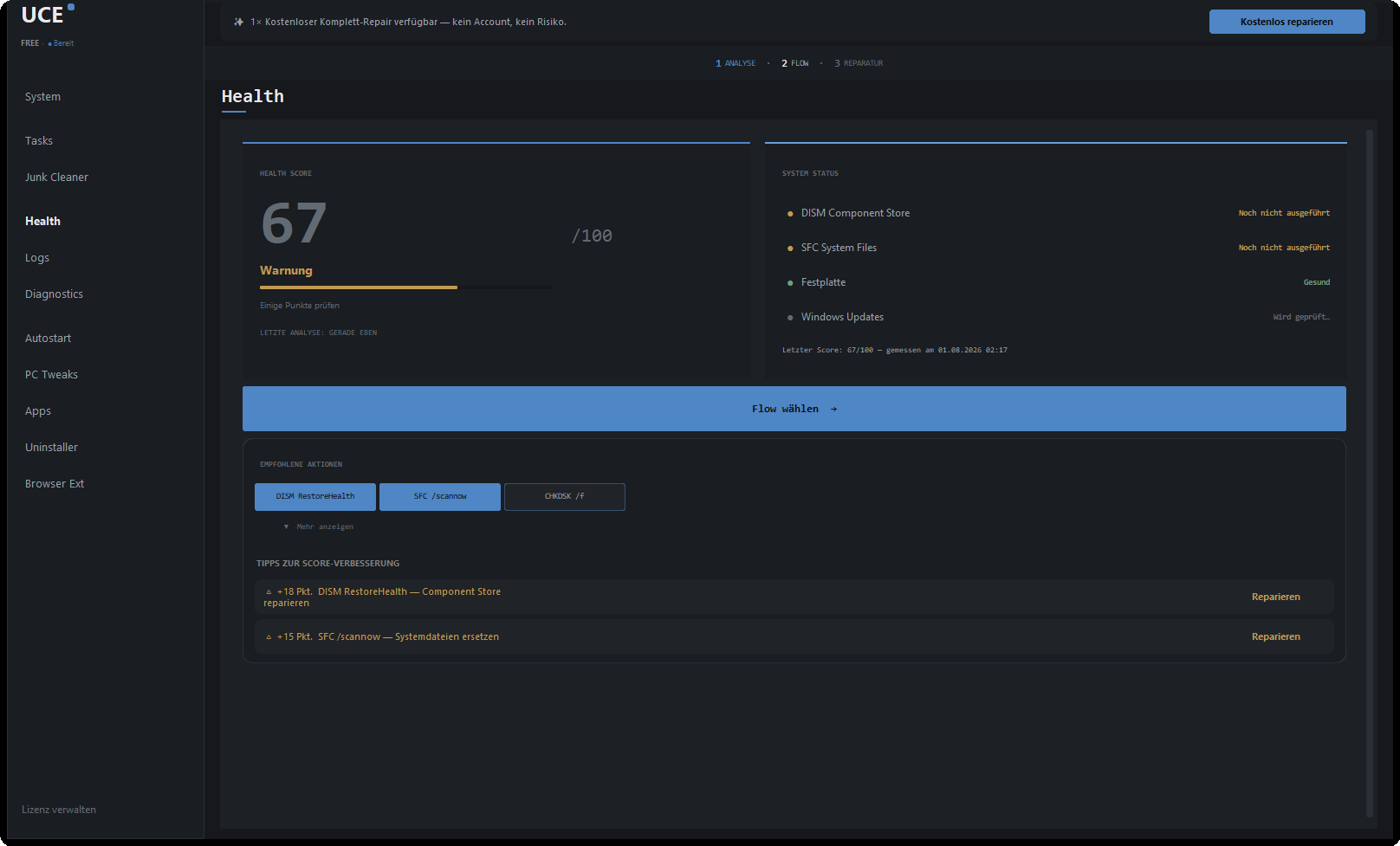
UCE bewertet Komponentenspeicher, Systemdateien, Windows Update, freien Speicherplatz, temporäre Dateien und freien Arbeitsspeicher und fasst das in einer Zahl zusammen. Du siehst, welcher Schritt wie viele Punkte bringt, bevor irgendetwas verändert wird.
Reparatur mit ausgewertetem Protokoll
DISM, SFC und CHKDSK laufen in der richtigen Reihenfolge. UCE wertet die Protokolle von DISM und SFC aus und fasst das Ergebnis in Klartext zusammen.
Boot- und Wiederherstellungsreparatur (BCD, WinRE)
Schreibt die Startdateien mit bcdboot neu und schaltet eine deaktivierte Wiederherstellungsumgebung mit reagentc wieder ein. Funktioniert nur, solange Windows noch startet.
Windows Update und WMI zurücksetzen
Für den Fall, dass Updates trotz intaktem Komponentenspeicher hängen bleiben: Die Update-Komponenten und die WMI-Datenbank werden zurückgesetzt.
Autostart und Deinstallation mit Restefinder
Sieh, was beim Start mitläuft, und schalte es ab. Programme deinstallierst du samt übrig gebliebener Ordner und Registry-Einträge.
Wiederherstellungspunkt vor riskanten Schritten
Vor Eingriffen in Komponentenspeicher oder Startsystem legt UCE einen Windows-Wiederherstellungspunkt an, sofern die Systemwiederherstellung eingeschaltet ist. Windows erlaubt davon höchstens einen pro 24 Stunden.
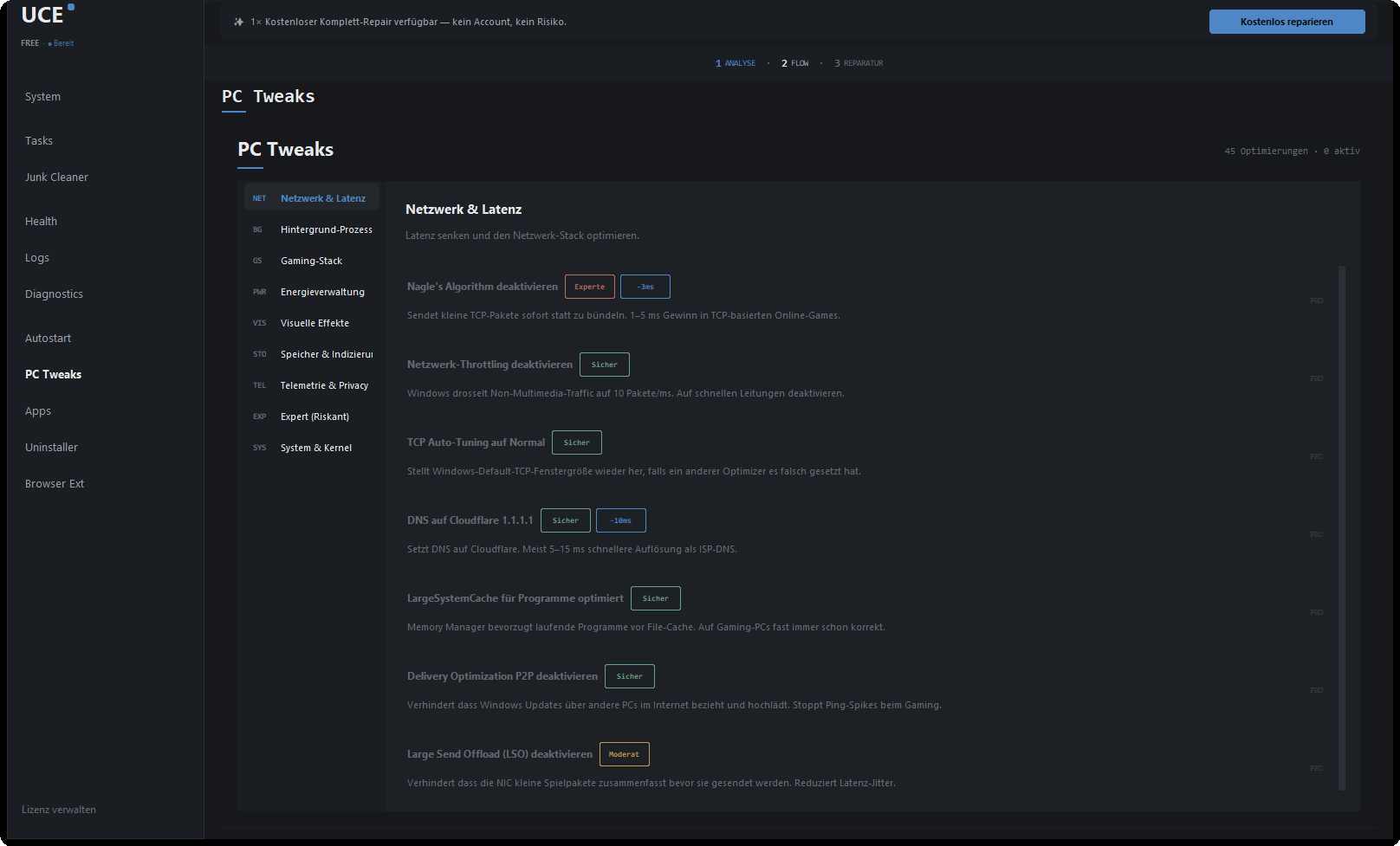
45 Systemeinstellungen mit Risiko-Etikett
Kein Programm sollte dich blind an Windows schrauben lassen. Deshalb steht bei jeder Einstellung dabei, was sie tut, wie riskant sie ist und was sie tatsächlich bringt, auch wenn die Antwort „ein paar Millisekunden“ lautet.
Von Hand oder mit UCE?
Die Befehle sind in Windows eingebaut. Wer sie beherrscht, braucht UCE nicht. Das hier ist der ehrliche Unterschied.
| Merkmal | UCE Pro | UCE kostenlos | Befehle von Hand |
|---|---|---|---|
| Reihenfolge DISM → SFC → CHKDSK | ✓ | nur Prüfung | Wenn man's weiß |
| Komponentenspeicher reparieren | ✓ | — | ✓ |
| Systemdateien ersetzen | ✓ | Nur-Lesen-Modus | ✓ |
| Kompletter Reparaturlauf | ✓ | einmal zum Ausprobieren | Von Hand |
| Systemzustand 0–100 | ✓ | ✓ | — |
| Ergebnis in Klartext statt Rohausgabe | ✓ | ✓ | Roher Output |
| Wiederherstellungspunkt vor riskanten Schritten | ✓ | — | Von Hand |
| Boot und WinRE reparieren | ✓ | — | bcdboot, reagentc |
| Windows Update und WMI zurücksetzen | ✓ | — | Viele Einzelbefehle |
| Preis | 29 € einmalig | 0 € | 0 € |
Was UCE nicht tut
Der PC-Optimierer-Markt lebt seit zwanzig Jahren davon, Dinge zu versprechen, die technisch nicht gehen. Hier steht, worauf wir verzichten, und warum.
| Was UCE nicht tut | Warum |
|---|---|
| ✕Keine erfundenen Fehlerzahlen | Wenn dir ein Programm 4.271 Fehler anzeigt und dann Geld will, hat es 4.271 Registry-Einträge gezählt, die völlig in Ordnung sind. |
| ✕Keine Registry-„Optimierung“ | Das Aufräumen der Registry bringt auf modernen Systemen keine messbare Geschwindigkeit. Es kann aber Software zerschießen. |
| ✕Kein Hintergrunddienst | UCE läuft, wenn du es startest, und ist danach wieder weg. Von selbst startet es nur, wenn du Autostart oder eine geplante Wartung ausdrücklich einschaltest. Ein Aufräumprogramm, das permanent mitläuft, ist ein Widerspruch in sich. |
| ✕Keine Cloud, kein Konto nötig | Das Programm braucht keine Anmeldung. Ein freiwilliges Kundenkonto auf der Website zeigt nur deine Schlüssel und Geräte. Scan- und Diagnose-Ergebnisse verlassen deinen PC nicht, außer als Protokollzeilen in einem Absturzbericht, den du freigibst. Was hinausgeht: die Abfrage nach Updates, die Lizenzprüfung, sobald du einen Schlüssel eingibst, und ein Absturzbericht, wenn du ihn freigibst. Keine Telemetrie, kein Tracking. |
| ✕Kein Abo | Einmal 29 €. Keine Verlängerung, keine Preiserhöhung im zweiten Jahr, keine Kündigungsfrist. |
Was UCE sendet und was nicht
Diagnose und Reparatur laufen auf deinem PC. Verbindung zu unseren Servern baut UCE nur aus drei Anlässen auf, einer davon nur mit deiner Freigabe.
Update-Abfrage
UCE ruft von releases.uce-software.com eine Versionsdatei ab. Mit der Anfrage geht nur die Programmversion mit.
Lizenzprüfung
Nur mit Schlüssel: Schlüssel, Gerätekennung als Hash, Rechnername, Betriebssystem und Version an api.uce-software.com.
Absturzbericht
Nur, wenn du ihn nach einem Fehler ausdrücklich freigibst. Er enthält den Fehlerverlauf, die letzten Zeilen des UCE-Protokolls, Windows- und Programmversion und eine zufällige Installationskennung. Lizenzschlüssel, E-Mail-Adressen und Benutzernamen in Dateipfaden werden vorher entfernt.
Keine Telemetrie
Kein Tracking, keine Nutzungsprofile. Diagnose-Ergebnisse und Dateilisten bleiben auf deinem Rechner.
Nachlesen
Welche Daten wofür und wie lange: alles steht in der Datenschutzerklärung.
Datenschutzerklärung →Systemanforderungen
| Betriebssystem | Windows 11 und Windows 10, jeweils 64 Bit. Voll unterstützt ab Windows 10 Version 2004 (Build 19041). Ältere Builds laufen mit einem Hinweis, weil einzelne DISM-Parameter fehlen können. |
|---|---|
| Rechte | Administratorrechte. Windows fragt sie beim Start ab. |
| Internet | Für die Diagnose nicht nötig. Genutzt für die Update-Prüfung, die Lizenzaktivierung und, nur mit deiner Freigabe, den Absturzbericht. DISM /RestoreHealth holt Ersatzdateien standardmäßig über Windows Update. |
| Aktuelle Version | 1.3.5 vom 24. September 2026 |
| Download | Installationsprogramm, rund 26 MB |
| Lizenz | Diagnose kostenlos und unbegrenzt. Pro für bis zu drei Rechner gleichzeitig. |
Diagnose kostenlos, Pro einmalig 29 €
Die Diagnose ist dauerhaft kostenlos. Du siehst also, was mit deinem Rechner los ist, bevor du dich für irgendetwas entscheidest.
- ✓ Vollständige Diagnose und Systemzustand
- ✓ DISM-Prüfung, SFC im Nur-Lesen-Modus
- ✓ Datenträgerprüfung
- ✓ Temporäre Dateien und Netzwerk zurücksetzen
- ✓ Einmal: ein kompletter Reparaturlauf zum Ausprobieren
- — Reparaturen danach ausführen
- — Autostart, Deinstallation, Tweaks
- ✓ Alles aus der kostenlosen Version
- ✓ Reparaturen jederzeit ausführen
- ✓ Autostart-Verwaltung und Deinstallation mit Restefinder
- ✓ 45 Systemeinstellungen in neun Kategorien
- ✓ Boot- und Wiederherstellungsreparatur (BCD, WinRE)
- ✓ Windows-Update und WMI zurücksetzen
- ✓ Freien Speicher sicher überschreiben
Zahlung über Stripe. Der Lizenzschlüssel kommt per E-Mail.
14 Tage
Widerrufsrecht
Dein gesetzliches Recht als Verbraucher, ohne Angabe von Gründen. Einzelheiten und Ausnahmen regeln die AGB.
Widerruf in den AGB →Ratgeber: Windows von Hand reparieren
Jede Anleitung funktioniert ohne UCE. Mit allen Befehlen und dem, was die Meldungen bedeuten.
DISM, SFC, CHKDSK: die richtige Reihenfolge
Die genauen Befehle, was jede Meldung bedeutet und was bei Fehler 0x800f081f hilft. Wann du das brauchst: Windows läuft, zeigt aber Fehler.
Anleitung lesen →SFC konnte Dateien nicht reparieren: CBS.log lesen
So findest du in der CBS.log, welche Dateien betroffen sind, und behebst die Ursache. Wann du das brauchst: SFC meldet „konnte einige nicht reparieren“.
Anleitung lesen →Windows reparieren ohne Neuinstallation
Sechs Stufen, von DISM bis zum Inplace-Upgrade, mit Dauer und dem, was jeweils erhalten bleibt. Wann du das brauchst: Nichts hilft, eine Neuinstallation steht an.
Anleitung lesen →Häufige Fragen zur Windows-Reparatur
UCE führt Microsofts eigene Reparaturwerkzeuge aus, keine selbstgebauten Eingriffe ins System. Vor riskanten Schritten, etwa der Reparatur des Komponentenspeichers oder am Startsystem, legt UCE einen Wiederherstellungspunkt an, sofern die Systemwiederherstellung eingeschaltet ist. Windows erlaubt davon höchstens einen pro 24 Stunden. Alles, was ein gewisses Risiko trägt, etwa eine Datenträgerreparatur, für die der Rechner neu starten muss, ist als solches gekennzeichnet und passiert nur nach deiner ausdrücklichen Freigabe.
Nein. DISM und SFC arbeiten ausschließlich an Windows-Systemdateien, deine eigenen Dateien und Programme fassen sie nicht an. Die CHKDSK-Prüfung läuft ohne Neustart, kleinere Dateisystemfehler kann Windows dabei selbst beheben. Eine Datenträgerreparatur mit Neustart läuft nur nach deiner Freigabe.
Das hängt vom Rechner und vom Schaden ab. DISM /RestoreHealth braucht meist 5 bis 30 Minuten, auf alten Festplatten länger, und bleibt dabei oft minutenlang bei einem Prozentwert stehen. SFC dauert zwei bis zwanzig Minuten. Die CHKDSK-Prüfung ist meist in wenigen Minuten durch.
Musst du nicht. Wenn du weißt, in welcher Reihenfolge sie laufen müssen, wie man die Protokolle liest und was die Ausgaben bedeuten, kommst du gut ohne uns zurecht, und die Diagnose bleibt trotzdem kostenlos. Bezahlt wird für den Teil danach: ausführen, überwachen, verständlich berichten, und die Werkzeuge drumherum.
Die Befehle selbst ausführen: Anleitung →Meist ist dann auch die Vorlage im Komponentenspeicher beschädigt. Führe zuerst DISM /RestoreHealth aus und danach SFC erneut. Findet DISM keine Quelle, geht es mit einer Windows-ISO als Quelle weiter. Welche Dateien betroffen sind, steht in der CBS.log.
CBS.log lesen: Anleitung →Nein. UCE läuft nur in einem laufenden Windows. Startet Windows nicht mehr, führt der Weg über die Windows-Wiederherstellungsumgebung. Solange Windows noch startet, kann UCE Pro die Startdateien neu schreiben und eine deaktivierte Wiederherstellungsumgebung wieder einschalten.
Windows reparieren ohne Neuinstallation →Das versprechen wir nicht. UCE repariert Windows, wenn Systemdateien oder der Komponentenspeicher beschädigt sind. Ist der Rechner nur langsam, liegt es selten daran. Mit Pro kannst du Programme abschalten, die beim Start mitlaufen, und bei jeder der 45 Systemeinstellungen steht, was sie tatsächlich bringt.
Die kostenlose Version prüft: vollständige Diagnose mit Systemzustand, DISM-Prüfung, SFC im Nur-Lesen-Modus, Datenträgerprüfung, dazu temporäre Dateien löschen und das Netzwerk zurücksetzen. Einen kompletten Reparaturlauf kannst du einmal kostenlos ausprobieren. Pro führt die Reparaturen danach jederzeit aus und bringt die Werkzeuge mit: Autostart und Deinstallation, 45 Systemeinstellungen, Boot- und WinRE-Reparatur, Windows Update und WMI zurücksetzen. Einmalig 29 € für bis zu drei Rechner.
Die Diagnose ja. UCE selbst verbindet sich aus drei Anlässen mit unseren Servern: beim Prüfen auf eine neue Version, bei der Lizenzprüfung, sobald du einen Schlüssel eingegeben hast, und beim Senden eines Absturzberichts, aber nur, wenn du ihn freigibst. Ohne Netz läuft die kostenlose Version uneingeschränkt weiter. Eine Ausnahme liegt bei Windows selbst: DISM /RestoreHealth holt Ersatzdateien standardmäßig über Windows Update. Ohne Verbindung geht das nur mit einer Windows-ISO als Quelle.
Deine Scan- und Diagnose-Ergebnisse und Dateilisten bleiben auf deinem Rechner. Bei der Lizenzprüfung gehen der Schlüssel, eine Gerätekennung als nicht umkehrbarer Hashwert, der Rechnername, das Betriebssystem und die Programmversion an unseren Server, damit wir zählen können, auf wie vielen Geräten der Schlüssel läuft. Ohne Schlüssel entfällt das. Ein Absturzbericht geht nur mit deiner Zustimmung hinaus. Er enthält unter anderem die letzten Zeilen des UCE-Protokolls, darin auch Diagnose-Ergebnisse, und eine zufällige Installationskennung. Lizenzschlüssel, E-Mail-Adressen und Benutzernamen in Dateipfaden werden vorher entfernt.
Details in der Datenschutzerklärung →Auf dreien gleichzeitig. Wenn du einen Rechner ersetzt, gibst du den Platz im Programm wieder frei und nimmst ihn auf dem neuen Gerät in Betrieb.
Windows 10 und Windows 11, jeweils 64 Bit. Voll unterstützt ab Windows 10 Version 2004. Für die Reparaturfunktionen braucht UCE Administratorrechte, das fragt Windows beim Start ab.
Sieh dir erst den Befund an.
Die Diagnose kostet nichts und dauert ein paar Minuten. Danach weißt du, ob dein Rechner überhaupt ein Problem hat, das sich reparieren lässt, und kannst immer noch entscheiden, dass dir das keine 29 € wert ist.
Version 1.3.5 · Installationsprogramm, rund 26 MB